|
|
|
|
|
This software was checked for viruses and was found to contain no viruses.
Click here
to see antivirus report.
|
|
| |
|
|
Video tutorial for KeePass Password Safe 2.0
This video tutorial has been acquired from Downloadtube.com
|
Review
This is official description
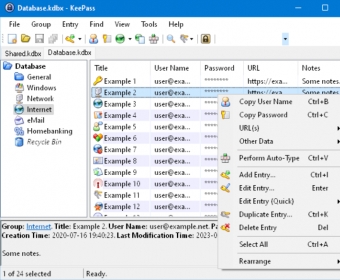
KeePass is an open source program that helps you manage your passwords in a secure way, with our passwords in its fully encrypted database with up to 256 AES security, one of the the largest and best-known encryption algorithms. With this program you can protect the access to the program only with a password or use the key that is created from the program.
The following review written by one of the Software Informer contributors applies to version 2.0
People like us, who are always aiming to many services on the web, need have to remember phone numbers, credit cards, password and others. Many times we have to create one password for all webiste (not recommended) or write down our passwords as it is not easy to remember. KeePass Password Safe Beta is a solution to manage and store our passwords!
As you guess, KeePass is a password manager for Windows and Pocket PC, which will put it in its database all the passwords for our services, it let you have to remember only a single password (the aplication own password), from them you will have access to the rest.
KeePass is an open source program that helps you manage your passwords in a secure way, with our passwords in its fully encrypted database with up to 256 AES security, one of the the largest and best-known encryption algorithms
You can protect the access to the program only with a password or use the key that is created from the program. If you use the wizard to create the password, both things are required: your password file and the generated password. A very effective system. |
- Free.
- Open source.
- Small download.
|
|
|
Reviewed by: Oscar Upegui Reviewer rating: Reviewed: 3 years ago
|
What's new in version 2.1
- When searching for a string containing a whitespace character, KeePass now splits the terms and reports all entries containing all of the terms (e.g. when you search for "Forum KeePass" without the quotes, all entries containing both "Forum" and "KeePass" are reported); the order of the terms is arbitrary; if you want to search for a term containing whitespace, enclose the term in quotes.
- When searching for a term starting with a minus ('-'), all entries that do not contain the term are reported (e.g. when you search for "Forum -KeePass" without the quotes, all entries containing "Forum" but not "KeePass" are reported).
- Added dialog in the options to specify a web proxy (none, system or manual) and user name and password for it.
- Added option to always exit instead of locking the workspace.
- Added option to play the UAC sound when switching to a secure desktop (enabled by default).
- Added filter box in the field references creation dialog.
- Added command to delete duplicate entries (entries are considered to be equal when their strings and attachments are the same, all other data is ignored; if one of two equal entries is in the recycle bin, it is deleted preferably; otherwise the decision is based on the last modification time).
- Added command to delete empty groups.
- Added command to delete unused custom icons.
- For Unix-like systems: new file-based IPC broadcast mechanism (supporting multiple endpoints).
- For Unix-like systems: added file-based global mutex mechanism.
- Auto-type on Unix-like systems: added support for sending square brackets and apostrophes.
- Two-channel auto-type obfuscation is now supported on Unix-like systems, too.
- Web access on Unix-like systems: added workarounds for non-implemented cache policy and credentials requirement.
- Added context menu command to empty the recycle bin (without deleting the recycle bin group).
- On Windows Vista and higher, when trying to delete a group, the confirmation dialog now shows a short summary of the subgroups and entries that will be deleted, too.
- In the auto-type target window drop-down combobox, icons are now shown left of the window names.
- Added {CLEARFIELD} auto-type command (to clear the contents of single-line edit controls).
- Added support for importing Sticky Password 5.0 XML files (formatted memos are imported as RTF file attachments, which you can edit using the internal KeePass editor; e.g. right-click on the entry in the main window and go 'Attachments' -> 'Edit Notes.rtf' or click on the attachment in the entry view at the bottom of the main window; see 'How to store and work with large amounts of formatted text?' in the FAQ).
- Added support for importing Kaspersky Password Manager 5.0 XML files (formatted memos are imported the same as by the Sticky Password importer, see above).
- Password Depot importer: added support for more fields (new time fields and usage count), time fields can be imported using the stored format specifier, vertical tabulators are removed, improved import of information cards, and auto-type sequences are converted now.
- Added ability to export links into the root directory of Windows/IE favorites.
- Windows/IE favorites export: added configuration items to specify a prefix and a suffix for exported links/files. In the entry editing dialog, KeePass now opens an attachment either in the internal editor or in the internal viewer, depending on whether the format is supported by the editor.
- When creating a new database, KeePass now automatically creates a second sample entry, which is configured for the test form in the online help center.
- Added configuration option to disable the 'Options', 'Plugins' and/or 'Triggers' menu items.
- Added workaround for Mono tab bar height bug.
- Added workaround for Mono FTP bug.
- Added workaround for Mono CryptoStream bug.
- Added workaround for a Mono bug related to focusing list view items.
- Added shell script to prepare the sources for MonoDevelop.
- Translations can now also be loaded from the KeePass application data directory.
- TrlUtil: added support for ellipses as alternative to 3 dots.
- KPScript: added 'DetachBins' command to save all entry attachments (into the directory of the database) and remove them from the database. |
|
Report a wrong version
Report a wrong program title
Suggest a correction
|
Screenshots
All 7 screenshots |
|
| .kdb |
KeePass Password Database |
| .kdbx |
KeePass Password Database |
| Back Up Plan Part I |
| In my lifetime I was many times asked to repair someone's computer. No matter what... |
All articles
|